
Tell-A-Friend

Click a link below for a specific topic
| Website Magnets Sections: |
|---|
| 1. Search Engines – Google, Yahoo, Bing, etc (Organic & Paid) |
| 2. Social Media (Free & Paid) |
| 3. Directories (Free & Paid) |
| 4. Press Releases, PR & Articles |
| 5. Blogs (Yours & Post on Others) |
| 6. Posting Expert Comments on Forums |
| 7. Article Directories / eZine Directories |
| 8. Video and Blog Sharing Sites |
| 9. Articles on Partner Sites / Partner Newsletters |
| 10. Affiliates / JV Partners / TeleSummits and Alliances |
| 11. Emails / Email Newsletters |
| 12. Banner & Text Ads (PPC, etc) |
| 13. Webinars / Teleseminars |
| 14. Viral Marketing |
| 15. Tell-A-Friend |
| 16. Promotional Marketers (Groupon, etc) |
| 17. Offline Marketing (Networking / Out-reach, Public Speaking, Telemarketing, Direct Mail, Directories, Paid Ad Media, PR, Business Cards) |
Using Tell-A-Friend to Attract People to Your Website
Some of your best clients will come from referrals. So, you want to make it as easy as possible for people to tell their friends about you.
Besides asking them directly, here are two tools that could help.
First is placing Social Sharing links on your website, especially above and beside key articles. This simplifies the sharing process. If someone reads something they like, with the click of a button they can post it to their Facebook page or Tweet it to their friends.
If you have a WordPress website, “Digg Digg” is a free plugin that provides a SHARE bar above each article and a floating SHARE bar to the left.

Additional tools are available from:
- www.sharethis.com which provides a free Social Sharing bar for your website; and
- www.addthis.com/ which provides a free and $12/month premium version with floating and embedded social media links for your website pages;
The second tool to simplify your clients’ ability to tell-a-friend, is the bottom of the emails you send.
This may seem like a basic idea, but it’s surprising how many people overlook or under-use this.
Outlook and other email programs allow you to add an email signature, often including images. Here are a few examples, (a) with text-only (right) that lists what services she has available, (b) with a photo and an image of the product (center) and (c) with an eye-catching logo and descriptive text.
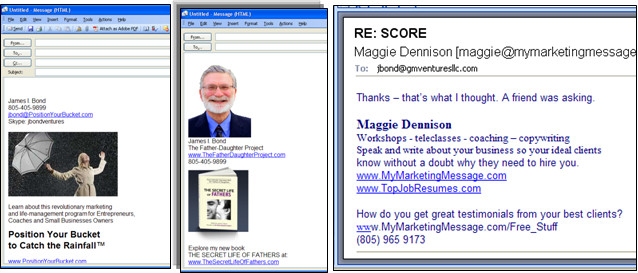
Many clients may not realize all the products or services you offer, so having a list can be valuable. Also, with information like this always at the bottom, forwarding your contact information to a friend becomes much easier… and they are reminded to do so every time you send an email.
SEE ALSO
.
If you’d like details about another Website Magnet — click on a link below
How will you bring “qualified” prospects to your website or web platform?
Search Engines | Social Media | Directories | Press Releases, PR & Articles | Blogs | Posting Expert Comments on Forums | Article Directories / eZine Directories | Video and Blog Sharing Sites | Articles on Partner Sites / Partner Newsletters | Affiliates / JV Partners / TeleSummits and Alliances | Emails / Email Newsletters | Banner & Text Ads | Webinars / Teleseminars | Viral Marketing | Tell-A-Friend | Promotional Marketers | Offline Marketing